Your IP address is a network address used to send data to and from your connection. To answer “what is my IP,” open a trusted IP-lookup tool for the public address websites see, or check your device's network settings for its local address.
Quick Answer
- A public IP lookup shows the address used for that browser connection.
- Your device's private IP usually identifies it inside a local network.
- IPv4 and IPv6 are different address formats; you may use both.
- An IP lookup can estimate location, but does not normally reveal a home address.
- A VPN changes the address visible to websites, but does not make you anonymous.
1. What Is My IP: check the right address first
For a quick public check, use an established service such as WhatIsMyIP.com. You do not need to install software, create an account, or enter payment details just to see a public IP address.
This DESHWISE guide does not detect your address. Do not mistake an example number in an article or screenshot for your own live result.
A lookup site sees the source address of your request. On home broadband, this may be your router's public IPv4 address. With a VPN, proxy, or privacy relay, it may be an intermediary's address instead. A mobile network can share an outward-facing address among customers.
Before checking, identify your connection: home Wi-Fi, work Wi-Fi, mobile data, or a VPN. Record the time and whether you checked IPv4 or IPv6. These details matter when comparing results or speaking to technical support.
Use a private IP address when connecting a printer or troubleshooting local Wi-Fi. Use your public address when checking what a website sees. Mixing these purposes is one of the most common reasons two correct results appear to disagree.
2. Understand public, private, and router IP addresses
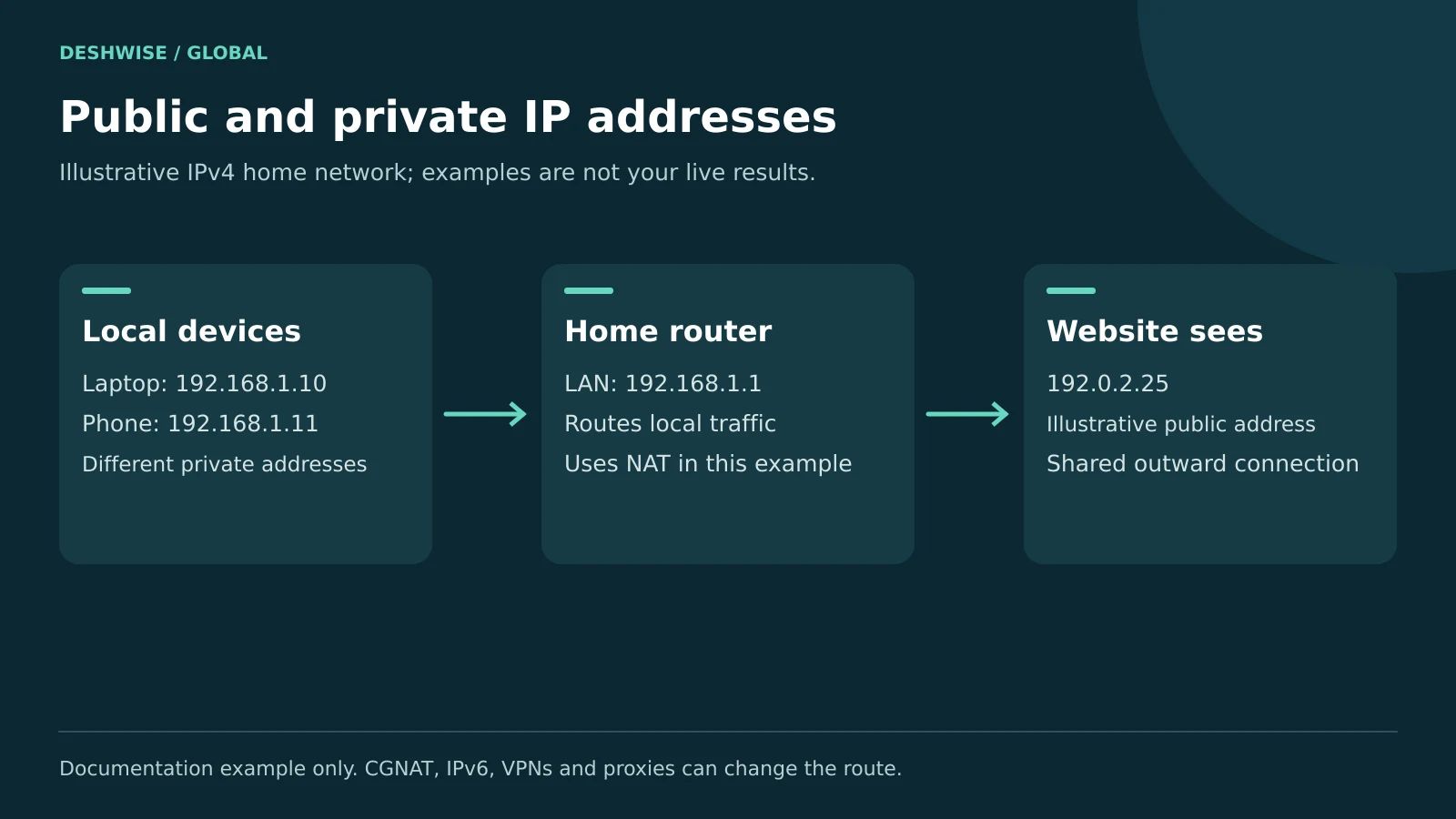
A public address is used for internet routing. A private IPv4 address is intended for use inside private networks and is not directly routed across the public internet.
Home routers commonly give each connected device a local address. Network address translation, or NAT, lets several devices use a shared public IPv4 connection. Your laptop and phone can therefore show different local numbers while a lookup website shows the same public one.
RFC 1918 reserves these private IPv4 ranges:
- 10.0.0.0 through 10.255.255.255.
- 172.16.0.0 through 172.31.255.255.
- 192.168.0.0 through 192.168.255.255.
Not every address starting with 172 is private. The reserved block covers only 172.16 through 172.31 in the first two parts.
Your router can have several addresses. Its LAN address, often shown as “default gateway” or “router,” is the local route out of your network. Its WAN address faces the upstream connection. The WAN address is not always public.
An internet provider may use carrier-grade NAT, or CGNAT. The shared range 100.64.0.0–100.127.255.255 is reserved for this purpose by RFC 6598 and is different from RFC 1918 private space. If your router's WAN address differs from a public lookup, ask your provider about CGNAT or another upstream router.
3. Compare IPv4, IPv6, static, and dynamic addresses
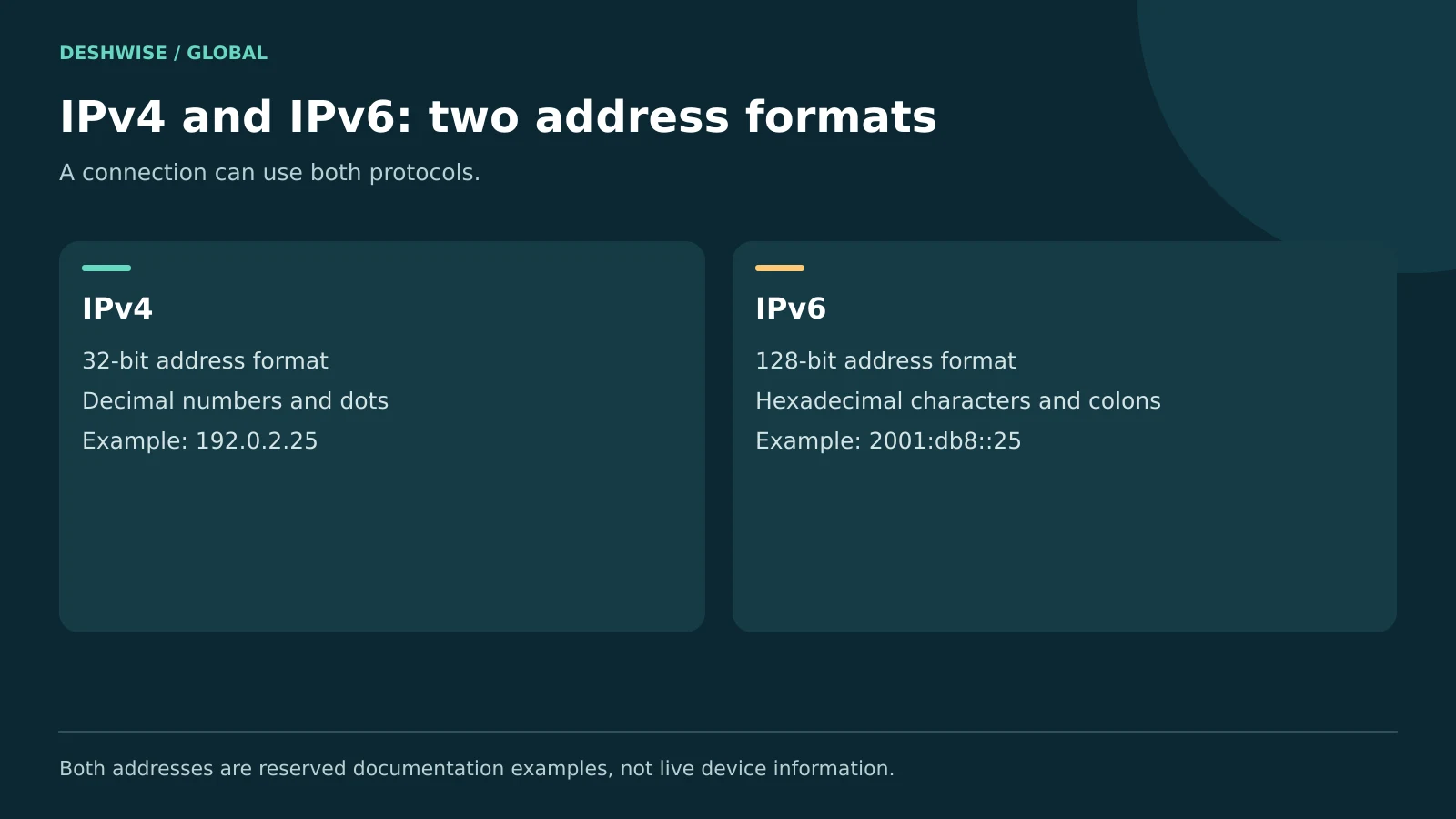
IPv4 uses 32-bit addresses, commonly written as four decimal numbers separated by dots. An illustrative documentation address is 192.0.2.25. It is an example, not a result from your connection.
IPv6 uses 128-bit addresses written with hexadecimal characters and colons. For example, 2001:db8::25 is a documentation example. IPv6 supports a much larger address space, and devices can have several IPv6 addresses for different purposes.
| Term | What it describes | What it means in practice |
|---|---|---|
| IPv4 | An address format | Often appears as four dot-separated numbers |
| IPv6 | Another address format | Uses colons; can coexist with IPv4 |
| Public | Internet-facing address scope | The address a public lookup may show |
| Private IPv4 | Address scope inside private networks | Useful for local devices and router setup |
| Static | Address assignment intended to stay fixed | Useful for some servers or managed systems |
| Dynamic | Address assignment that can change | Common on home and mobile connections |
These labels describe different things. A public IPv4 address can be static or dynamic. A private address can also be assigned automatically or reserved for a device.
An address that stays the same for weeks is not proof you have a static service. Providers may reuse an existing assignment. Likewise, an IPv6 device may use temporary addresses while its network prefix follows a different schedule.
Do not disable IPv6 merely because its format looks unfamiliar. Troubleshoot a specific problem first. It is not automatically faster, slower, safer, or less private just because it is a newer protocol.
4. Find your IP address on Windows and Mac
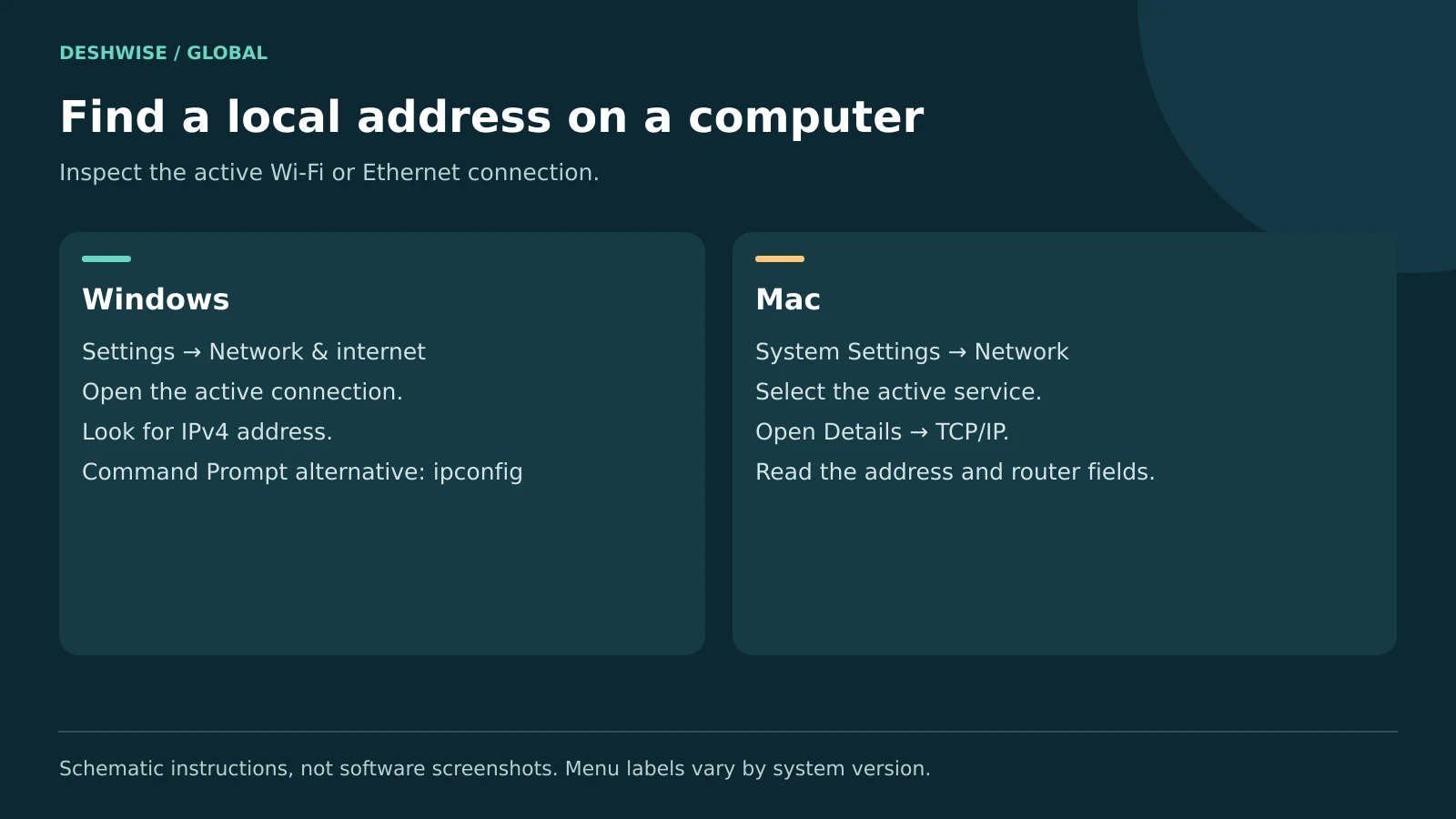
Windows: use Settings or a command
On current Windows versions, start with the active network's properties. Menu wording may vary by release.
- Open Settings → Network & internet.
- Choose Wi-Fi or Ethernet, depending on your connection.
- Open the connected network's properties.
- Find IPv4 address and any IPv6 address listed.
For a command-line view, open Command Prompt and run:
ipconfig
Find the active Wi-Fi or Ethernet adapter. Ignore disconnected adapters and recognise that a VPN may add another interface. “IPv4 Address” is the local address; “Default Gateway” is usually the router on that connection.
The Windows network profile labelled “Public” or “Private” is a firewall and discovery setting. It does not mean the adapter has a public or private IP address. Microsoft's network settings guide explains these controls.
Mac: inspect the active connection
- Open Apple menu → System Settings → Network.
- Select the connected Wi-Fi or Ethernet service.
- Open Details, then TCP/IP, where available.
- Read the IP address and router information.
Depending on macOS, Wi-Fi details may also be accessible directly from its settings page. For older releases, look under System Preferences and Network.
Use the settings view rather than copying a terminal command that assumes a particular interface name. Ethernet, adapters, and virtual networks can change which interface is active. A browser lookup remains the simplest cross-platform way to find the public address.
5. Find your IP on Android, iPhone, and your router
Android
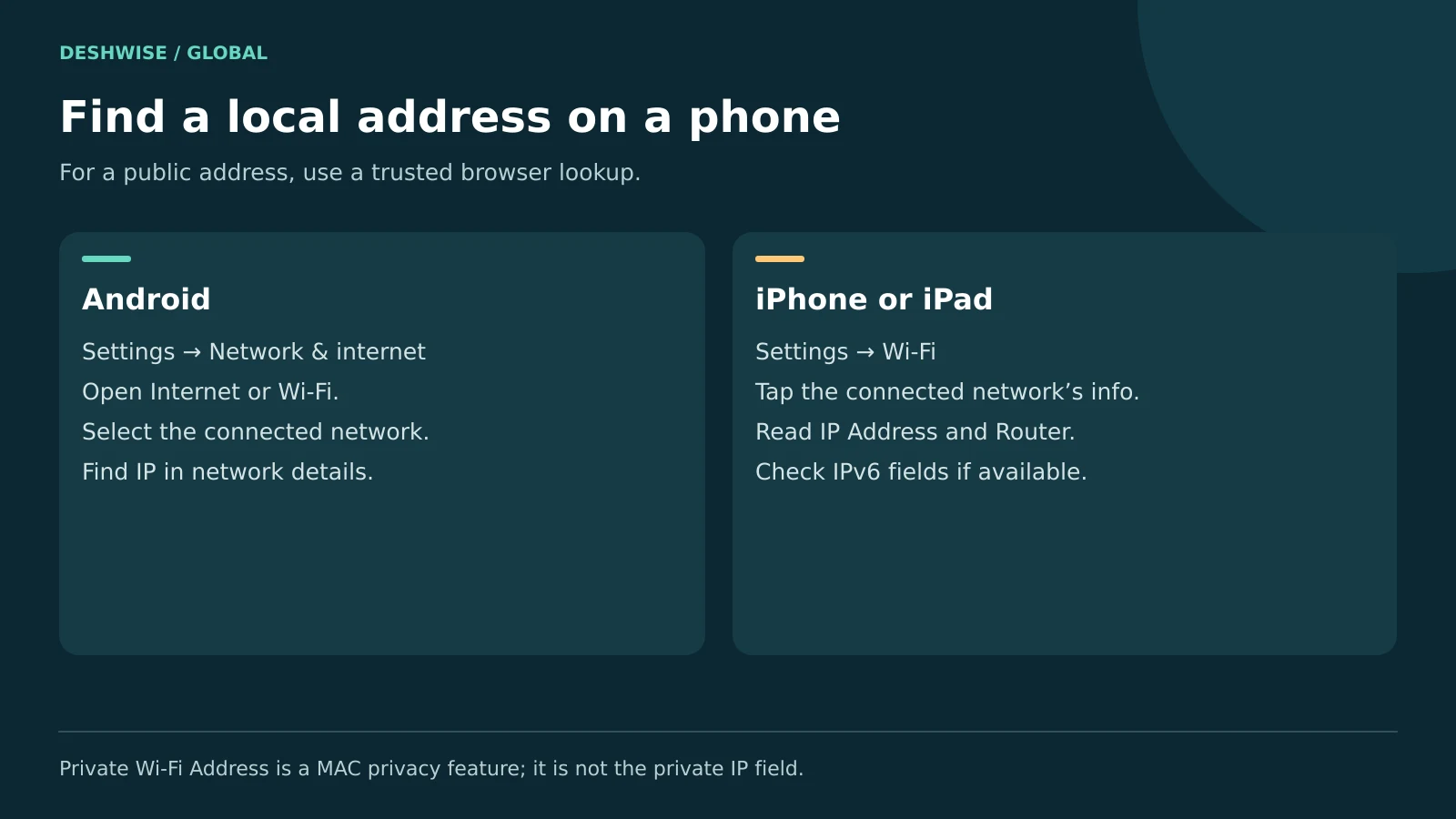
Open Settings → Network & internet → Internet, then tap your connected Wi-Fi network or its settings icon. Look for network details, advanced information, or an IP address field.
Samsung, Motorola, Pixel, and other devices can use different labels. If needed, search Settings for “IP address” or inspect the phone's status information. Confirm you are reading the active connection, not a saved Wi-Fi profile.
For the public address used on mobile data, disconnect Wi-Fi and open a public lookup in the browser. Data charges may apply. Reconnect to Wi-Fi afterward if that is your normal connection.
iPhone or iPad
Open Settings → Wi-Fi and tap the information button beside the connected network. Look under the IPv4 section for IP Address, Subnet Mask, and Router. An IPv6 section may also appear.
“Private Wi-Fi Address” refers to a MAC-address privacy feature. It is not the same as your private IP address. A MAC address identifies a network interface at a different networking layer.
Router
On a network you own or administer, use its official app or the gateway address shown by your device. Sign in with authorised credentials, then find Internet, WAN, or connection status.
Do not assume a default address or password from a random website. Check the router label or manufacturer's instructions. Viewing status should not require changing DHCP, firewall, or port-forwarding settings.
6. Understand what your IP reveals about you
An IP lookup may identify the network operator, the organisation holding the address range, and an estimated country or region. Some services show a city, but accuracy varies and databases can disagree.
A point on a lookup map may represent a network facility or a general area. It is not proof that a particular person lives at that point. Mobile routing and VPN servers can make the displayed city especially misleading.
An IP address alone does not normally reveal your name, passwords, private messages, or exact street address to a casual lookup user. However, that does not make it meaningless personal information.
A website can combine an address with account activity, cookies, and other signals. A provider may be able to connect an assignment to a subscriber using its own records and a timestamp, subject to applicable processes. Several people may also share one public address.
IP address location differs from GPS or browser location permission. Denying precise location does not stop a website from estimating your region from its network connection. Conversely, granting location permission can provide much more precise information than an IP database.
These principles apply internationally. Database coverage, provider routing, and local privacy rules differ; a result is not a reliable nationality check or identity document.
7. Use VPNs and privacy tools with realistic expectations
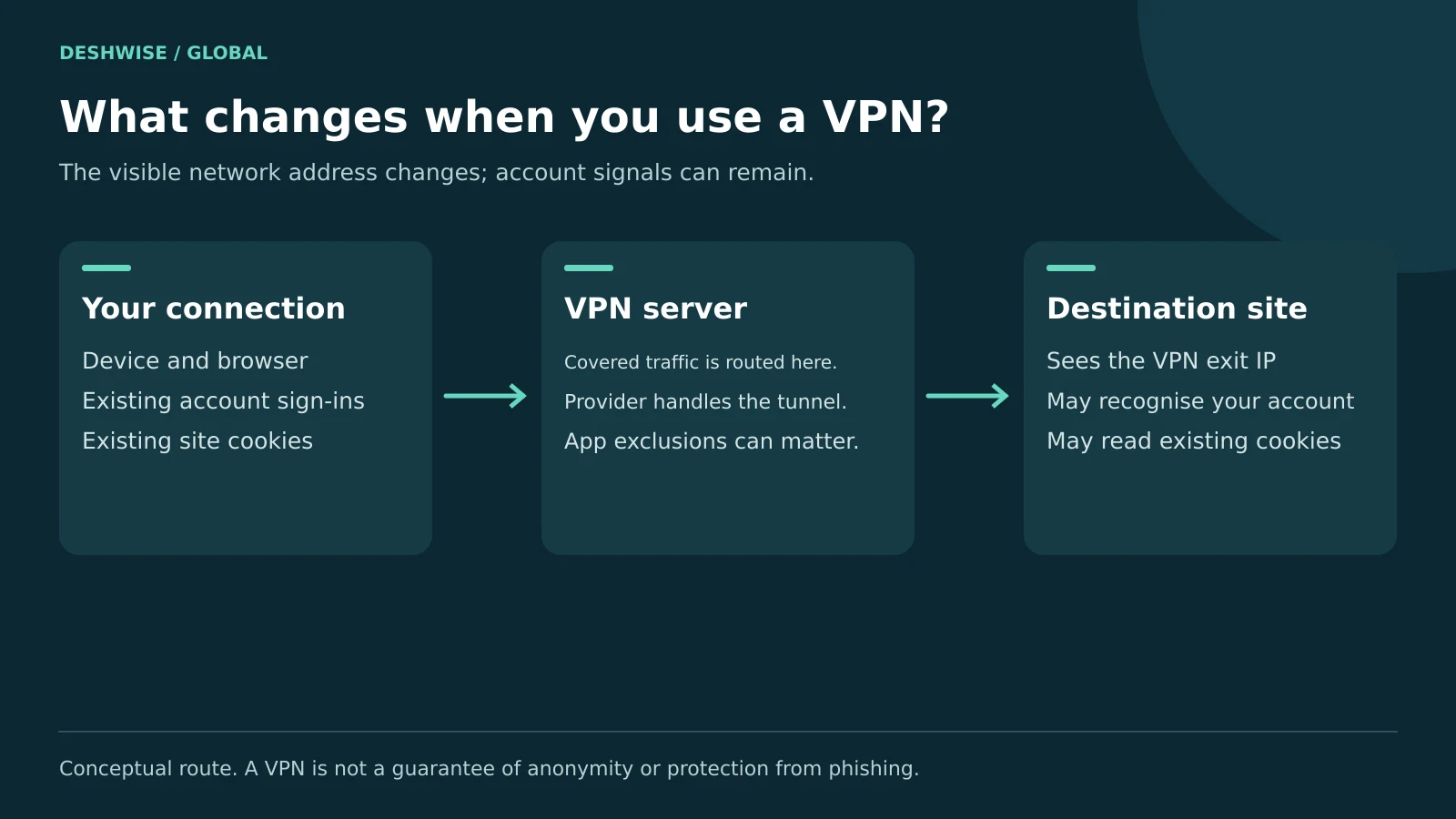
A VPN routes covered traffic through a server. Websites reached through that route generally see the server's outward-facing IP rather than your usual connection's address.
To compare your VPN IP address:
- Check your public address before connecting.
- Connect through the VPN's official application.
- Reload the same lookup service and compare results.
- Check both IPv4 and IPv6 if the service supports them.
- Repeat after a network change if privacy is important to your task.
A changed result confirms what that browser request exposed. It does not prove every app uses the tunnel. Split tunnelling, excluded apps, and different protocols may affect coverage.
A VPN does not erase cookies, hide activity from an account you sign into, or prevent phishing. It also shifts trust toward the VPN provider. Consider its ownership, policies, security record, and independent assessments rather than relying on a “no logs” slogan.
Keep devices and routers updated, use strong unique passwords, enable multifactor authentication, and leave the firewall enabled. Prefer HTTPS websites. A VPN is one tool within those habits.
Privacy note: This is general information, not a promise of anonymity. Use workplace and school networks within their policies, and check local requirements before using privacy services.
8. Change an address without creating a network problem
For a different public connection, switching from Wi-Fi to mobile data will often produce a different outward address. A VPN can change the address visible to covered websites. Neither option guarantees a particular country result or access to a restricted service.
Restarting a router may or may not change a dynamic public address. A DHCP lease renewal on your laptop normally concerns the local assignment; it is not a reliable way to request a new public address from your provider.
For a printer or local server, a router's DHCP reservation is often easier to manage than manually assigning an address on the device. It helps avoid conflicts, but you must follow the router's documentation and your network administrator's rules.
If a service requires a static public IP, ask your provider about availability, IPv4 versus IPv6 support, fees, and whether CGNAT applies. There is no universal global price.
Do not change DNS settings expecting a new public IP. DNS translates names into addresses; changing the resolver does not itself replace the address your browser uses to reach websites.
9. Troubleshoot confusing results and avoid common myths
Two sites show different addresses
One site may use IPv4 and another IPv6. A browser proxy or privacy relay may affect one request. Compare protocol, network, and time before deciding something is wrong.
The lookup shows the wrong city
Check whether a VPN, mobile network, or work gateway explains it. Consult the lookup provider's correction process if needed. Do not factory-reset a working router just to change a database estimate.
The device has an address but no internet
An IP assignment proves only part of connectivity. A router outage, captive Wi-Fi login, DNS failure, or provider problem can still block browsing. Check another trusted website, then another device on the same connection.
A Windows IPv4 address beginning 169.254 often indicates link-local self-assignment when normal DHCP configuration failed. Reconnect and check the router before entering random static values. On managed networks, contact support.
Someone says they know your IP
An address alone is not proof they control your device. Do not pay a threat sender or install their “fix.” Keep security updates current, avoid exposed remote administration, and contact your provider if you face persistent attacks.
Incognito mode does not hide your IP. A static IP is not automatically insecure, and a dynamic IP is not automatic protection. Security depends on exposed services, configuration, authentication, and maintenance too.
10. Frequently asked questions
What is my IP address on my phone?
For your public address, open a trusted IP-lookup website using the connection you want to check. For a local Wi-Fi address, open the connected network's details in Settings. Wi-Fi and mobile data can produce different results, and a VPN or privacy relay may change what the browser shows.
Is my IP address the same as my Wi-Fi address?
The phrase “Wi-Fi address” can mean different things. In some device menus it refers to a MAC address, not an IP address. A local Wi-Fi IP identifies the device on that network, while a public lookup shows the address used to reach an internet service through the current route.
Can someone find my home from my IP address?
A normal public lookup does not reveal an exact home address. It usually offers an estimated area and network information, which may be inaccurate. However, an IP can be combined with account records or other data. Treat it as contextual information and avoid sharing network screenshots unnecessarily in public.
Why does my IP address keep changing?
Your provider or local router may assign addresses dynamically. Moving between Wi-Fi and mobile data, reconnecting a VPN, or using temporary IPv6 addresses can also change results. Compare the same address type on the same connection before troubleshooting. A changing address is often expected rather than a security problem.
Does a VPN hide my IP from everyone?
No. Websites reached through the VPN generally see its server address, but the VPN provider handles your connection and your internet provider can still see that you connect to it. Logged-in services can recognise your account. Tunnel exclusions or configuration problems may expose traffic outside the route you expected.
Is it safe to use a free IP lookup tool?
A simple browser lookup can be reasonable if you choose an established site and review its privacy practices. It should not need a download, password, or payment card to display your public address. Avoid alarming ads that claim an ordinary visible IP proves you have been hacked or must buy protection.
11. Your next step
Answer “what is my IP” by first deciding whether you need a public browser address or a local device address. Check the right place, note the connection and protocol, and share results only with trusted support when necessary. For better privacy, combine sensible network tools with good account security.